
Getting paid
Payout eligibility
Every check the dashboard runs before a payout can be requested, in the order it runs them.
The Request payout window shows a live checklist for the account you pick. Every item must be green.
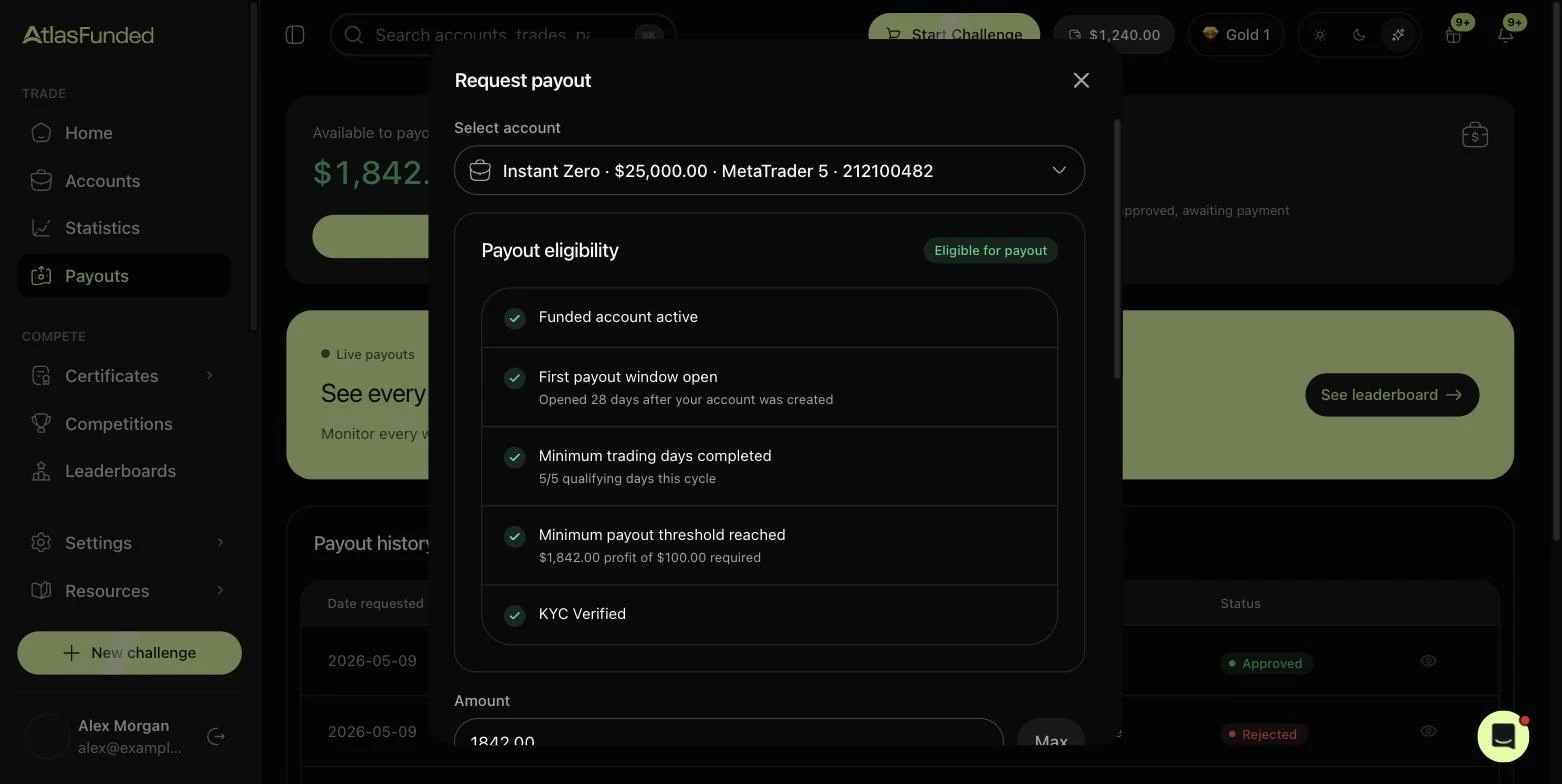
| Check | Passes when | If it fails |
|---|---|---|
| Funded account active | The account is funded and not breached | Only funded accounts can be paid |
| No payout already open | This account has no payout pending | Wait for the current one to be paid or rejected |
| Account in profit | Balance is above the starting balance | Trade until you are in profit |
| Payout window open | The first window, or the next cycle, has opened | See the countdown on the Next payout card |
| Minimum trading days completed | You have the qualifying days for this cycle | Keep trading; losing days don't reset the count |
| Minimum payout threshold reached | Profit is at least $100 ($50 on Pro) | Grow profit past the threshold |
| KYC verified | Your identity is approved | Complete KYC. Your first request opens the flow. |
On Instant Funded and Access funded accounts, the consistency rule also applies. With the Daily Payouts add-on you must also be flat and above the buffer.
Weekends are fine
You can request a payout on any day of the week.
Last reviewed 27 September 2026. Rules shown are read from the Atlas risk engine.